FreeBSDKit provides idiomatic Swift, C and C++ interfaces to FreeBSD’s unique system features including Capsicum sandboxing, jails, process descriptors, kqueue-based signal handling, and inter-process communication with descriptor passing. The framework embraces move-only semantics (~Copyable) to model resource ownership explicitly in the type system.
“FreeBSD” hooked me, “move-only semantics” got me interested, “jail” made me read the README.
I only know about FreeBSD’s features from Oliver Epper, but everytime he talk about it, I want to play with the OS. These features sound generally useful to run applications in relative isolation without the Docker overhead. Having a genuinely attractive Swift package for this makes the urge to experiment even stronger!
FreeBSD Jails as an OS-level virtualization option in particular got me interested for NAS/home server work. Code snippet for jail management:
importJailsimportDescriptors// Build jail parametersvariov=JailIOVector()iov.add(key:"name",value:"myjail")iov.add(key:"path",value:"/jail/myjail")iov.add(key:"host.hostname",value:"jailed.local")iov.add(key:"persist",value:true)// Create jail and get descriptorletflags:JailSetFlags=[.create,.getDesc,.ownDesc]varjailDesc=trySystemJailDescriptor.set(iov:&iov,flags:flags)// Attach current process to jailtryjailDesc.attach()// Remove jail (requires owning descriptor)tryjailDesc.remove()
In my initial post about this problem, I talked about the observations and how I began to figure out where the permission problem came from. I turned out to be an attempt at changing the file extension from .txt to .md. When the user opens a .txt file in your app, macOS makes sure you only get access to that exact file path by default. You cannot just write willy-nilly anywhere else without the user’s permission. File extension changes are included in this protection.
When I researched what caused TableFlip to lose permissions to write out files, I learned about “related items” in the Sandbox. A good example from the docs is to open a movie file plus its subtitle captions together. The user would select the movie in an NSOpenPanel. This usually grants access to the movie file directly per Sandboxing restrictions. You can declare the subtitles file to be a related item so that the Sandbox allows you to read both. That’s clever.
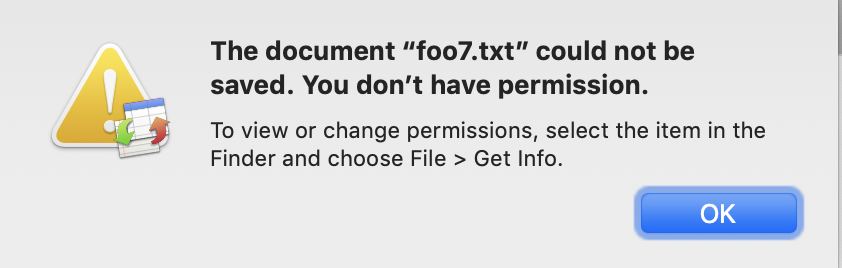
Users have reported problems with TableFlip saving their files recently. One wrote about it in the Zettelkasten forums, if you want to see the problem in context. To reproduce the problem: when you open foo.txt in TableFlip and a text editor, then change the file in the editor rapidly, TableFlip would show a “You don’t have permissions” error once you tried to save changes from TableFlip later.
Here’s how I fixed the inter-process communication sample app called AppSandboxLoginItemXPCDemo by Apple to make it work. When I tried it out at first, sandboxing ruined the day. You have to change a few things in order to make it work.